How do I uninstall an iPhone AppStore application?
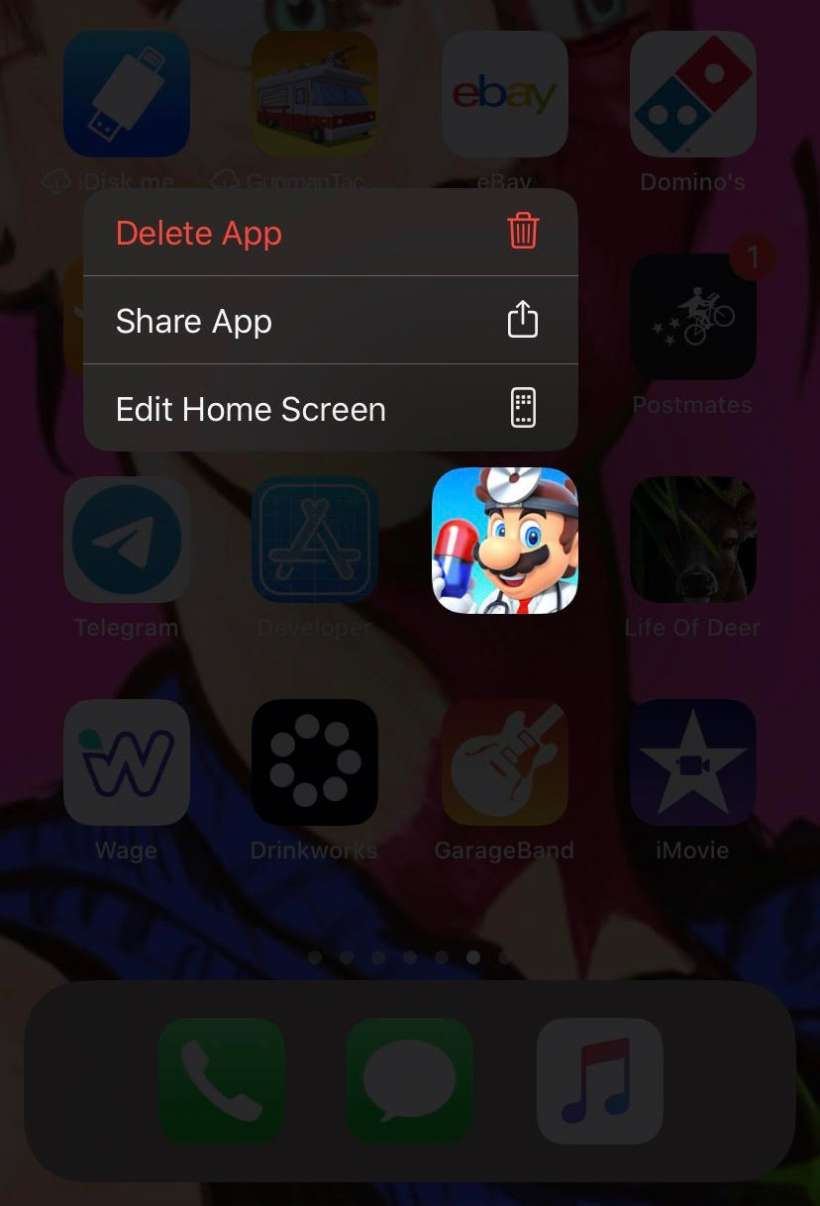
To uninstall an application purchased or otherwise installed from the Apple App Store, simply do the following:
- On devices running iOS 13 or later hold your finger on the icon for the application you wish to uninstall (the same action you take to move or re-arrange home screen icons). On devices running iOS 14 or later you can hold your finger anywhere on the Home screen to make all apps on the Home screen wiggle.
- Click the "x" in the upper left hand corner of the icon for the application you wish to remove. In iOS 14 or later tap the the minus (-) sign in the upper left-hand corner to delete an individual app.
You can also use Touch ID to bring up and individual app menu to remove an app from your device. Just use a long press on the app icon you would like to remove then tap the Delete App tab from the app menu.
If you want to re-install the application at a later time, simply visit the AppStore and select the application again.
tags:
Comments
Brandon Steili replied on Permalink
Not entirely true - sure that removes it for the time being - but if you sync your phone to iTunes it will automatically reinstall it. In order to keep that from happening you either have to specify which applications sync in the iTunes preferences for the device, or you have to delete the application from both iTunes and the iPhone/Touch.
iPhone replied on Permalink
Can you explain how to do that ?
Anonymous replied on Permalink
just click on applications in iTunes, right click on the app and click delete
Anonymous replied on Permalink
hi, why am i unable to perform a right click to delete the application. I am able to remove it from my iphone but i want to delete it from the application store too
JGPenman replied on Permalink
Did you ever find out how to delete an app from the istore. I can delete apps easily from my iphone, but have a long list on my itunes account and would like to get rid of most of them, but can't work out how.
Thanks
James
Anonymous replied on Permalink
To delete apps from showing in iTunes under the apps tab under DEVICES. You cannot do it under the device. You must go to the LIBRARY in the left hand navigation menu. Then select Apps under LIBRARY and you will see a list of all your iPhone and iPod touch Apps. Now right click on any app you would like to delete and select Delete from the drop down menu. Click remove and then click Move to Recycle Bin.
88ender88 replied on Permalink
excellent answer
prl replied on Permalink
Simple fix, easy once you know how.
Thank you
Anonymous replied on Permalink
Perfect. THANKS!
Anonymous replied on Permalink
Ditto "excellent answer"
disco diva replied on Permalink
i've done that, but now it won't let me re-install it, it shows up as already installed.
Anonymous replied on Permalink
How come I can't reinstall my textfree with voice app?
Beth Stamand replied on Permalink
I'd like my meet me profile pof friends profile back an my kik
Anonymous replied on Permalink
Thank you much
Anonymous replied on Permalink
Awesome help. And if you have any questions about Viber, feel free to ask.
Anonymous replied on Permalink
thank you thank you thank you! Been wondering about that, simple once you know how.
Anonymous replied on Permalink
I already did that but the app is still on my iphone it still loading or waiting
Mint replied on Permalink
I have download Jack of All Tribe from iTunes. Unfortunately the apps did not completely downloaded and it leave incompleted apps icon with 'waiting'/'loading' on my iPhone 3gs. The second time I download it again, it finally succeed but the fully downloaded apps icon did not appear on my iPhone. The only Jack of All Tribe icon that exist is the one that not complete. But it was there on iTunes windows. I removed completely the apps but the incomplete icon still there and I was unable to remove it. Please help me
Anonymous replied on Permalink
Excellent answer. Answered the query.
Thanks,
Anonymous replied on Permalink
Super. Not as intuitive as one might think.. but I'll be happy to get rid of some of the free apps I tried and decided against that I really want to stop getting updates and pushes for.
Anonymous replied on Permalink
Thanks a ton!
Grant replied on Permalink
Thank you I have been wanting to do this for ages and now I know how to. Cheers!
Anonymous replied on Permalink
Thank you!!!!
Anonymous replied on Permalink
Thank you!!
Anonymous replied on Permalink
You go to all apps then right click the info and just click delete
Claudiu replied on Permalink
To delete an iPhone app from iTunes after uninstalling it follow these steps:
1. Go to iTunes preferences>General - make sure the box "Apps" is ticked
2. Press Ok
3. Go to the "Apps" tab from the navigation panel in the left and you will see all applications. Click right on the application you want to permanently delete from iTunes (which you don't want to get synced with your phone and get again installed).
As to removing an app from iPhone, just follow what has already been said.
Cheers
dr sajid replied on Permalink
i would like to explain for those who have re-installed windows 7 and want their applications back.
so all the application you have on the phone can transfer on i tunes.open file menu and there is an option transfer your purchases of iphone. it will transfer all app free or purchased back to itune.
Anonymous replied on Permalink
I've heard others say that apps resync back onto the iPhone when they've deleted them, but that hasn't ever been my experience... If I delete from the iPhone I it does not come back. If I want it to come back I can checkbox the app in the iPhone's Apps tab when it is connected.
purple bacteria replied on Permalink
I had to reinstall Mac OS. When sincying with the iphone afterwards, I chose the wrong option and itunes erased all applications and settings in Iphone. How can I recover paid applications without paying them again?
Anonymous replied on Permalink
You can download the apps and it will say that you have already purchased them and if you would like to download them again for free. It worked for me.
Pages